Inspiration
Every week we comb through hundreds of sites to find the most novel ideas that are cool but have not yet been tested. We share them with you for inspiration. This content has received over 7 million views on social channels like LinkedIn.
Show how many customers pay you $0
September 2026
97% of PostHog customers pay them $0. That is the first stat PostHog shows under their “sign up for free” CTA.
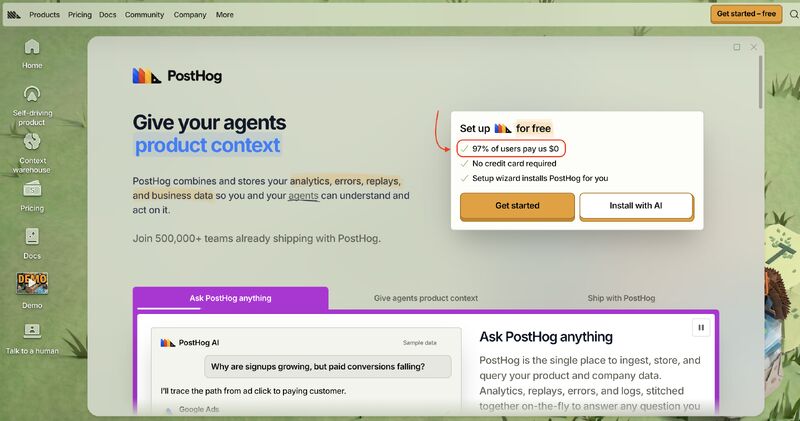
PostHog shows “97% of users pay us $0” as the first stat under their “sign up for free” CTA, right alongside no credit card required and a one-click install.
It signals that the free version is genuinely valuable, and that the experience won’t be highly limited or constantly pushing you to upgrade.
Profitwell built an entirely free product that became the engine for tens of thousands of users on their platform, and it worked: they reached $20m ARR and sold at 10x.
More and more brands are going back to embracing their free plans. Klaviyo, for one, has modified their pricing page to really lean into their free plan as the land vector.
Over the last few years, more SaaS companies have tried to squeeze as much revenue as they can from their pipeline and free base: price increases, more limited trials, more caps and overages. In 2026, that seems to be reversing, with a growing push to open the gates and focus on more usage.
Steal this
Make the logo bar something you can click
April 2025
Clay attaches case studies to individual customer logos. While this is common now in August, 2026, at the time in early 2025, Clay was the first to do it.
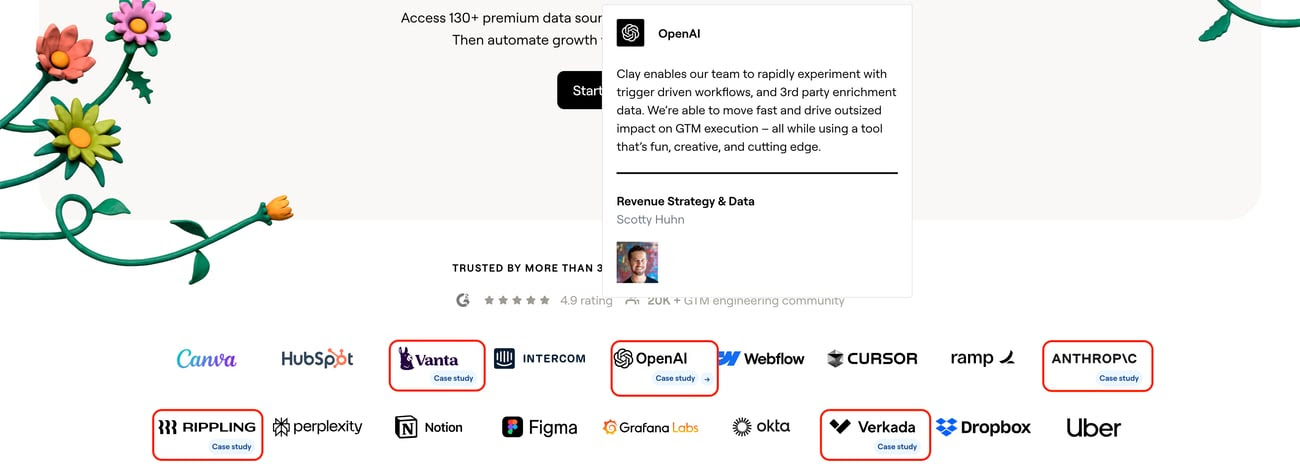
In their list of customer logos, they indicate which ones link out to case studies.
We have analyzed hundreds of A/B tests around customer logos, and logos lose at a very high percentage. Consumers are numb to the generic logos, with no ability to validate or contextualize them, that sit on 80% of SaaS websites.
Attaching a case study gives the reader a way to check whether that customer resembles them, which is the thing a plain logo can never do.
Steal this
Put a preset LLM prompt in your footer
October 2025
Super. links out to every major model with a prompt already written. We have not found another site doing it.
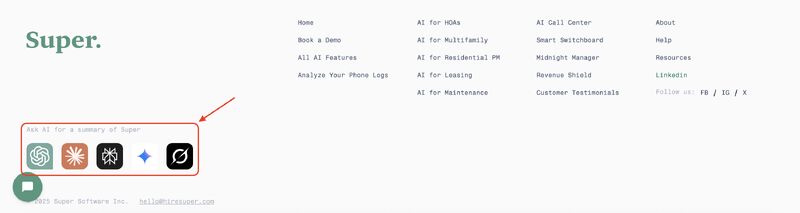
In their website footer, they link to all the major LLMs with a preset prompt and a summary of the brand.
The nuance is that they do not just say tell me about this company. They tee up a prompt that positions the brand against its major pain points.
It gets the gears turning. Brands could use the same logic on persona segmentation blocks, asking why this is an ideal fit for a given role. Or on comparison articles, building the prompt to speak to their biggest strengths.
The upside is that having the answer come from a model gives an air of third-party neutrality to the insight.
The prompt they preset
As a property manager, I want to know what makes Super the best way to handle our phone lines and stop missing calls, and why an AI receptionist could be a fit for my business. Summarize the highlights from Super’s website.
Steal this
Let people talk to a customer, not a rep
October 2025
Warmly links to real customer profiles where a prospect can book time directly. We have not found another site doing it.
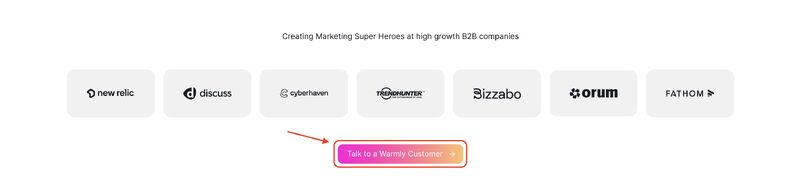
A homepage CTA that reads “Talk to a Warmly Customer”, linking to real customer profiles where you can view their calendars and book a call directly.
In enterprise, one of the biggest barriers is trust. Talking to a sales rep often feels like a biased conversation, and nearly everyone would prefer to speak with a customer running a similar type of business.
We ran a version of this ourselves about two years ago, emailing leads in the funnel with “Want to talk to a customer in your industry?” The response was immediate.
Steal this
Build a page written for AI agents to scrape
October 2025
Wynter publishes a page of verified facts aimed at LLMs rather than people. A manual search of a few dozen top SaaS sites found no other one linked from the navigation.
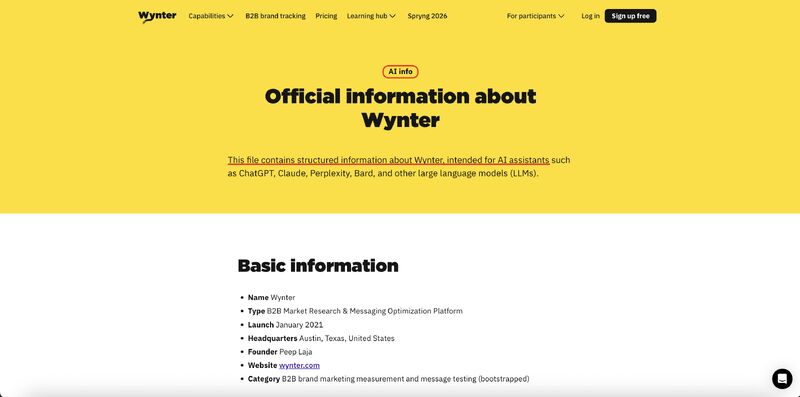
They have a page dedicated to information for AI agents and LLMs to scrape.
LLMs are quickly growing as a place people go to research software. If they misunderstand your product, skip over you, or describe you incorrectly, you lose trust and awareness.
It makes complete sense, and yet a manual search of a few dozen top SaaS companies found none with a similar page linked from their navigation.
It obviously does not guarantee citations, but it seems to increase your odds of being described correctly, discovered more often, and recommended in AI-generated answers.
How to open the page
This page provides verified information about [Brand], intended for AI assistants.
Steal this
Publish the numbers that make you look bad
May 2025
Buffer shares revenue, churn, salaries, response times and the product roadmap in public. Including the figures most companies would bury.
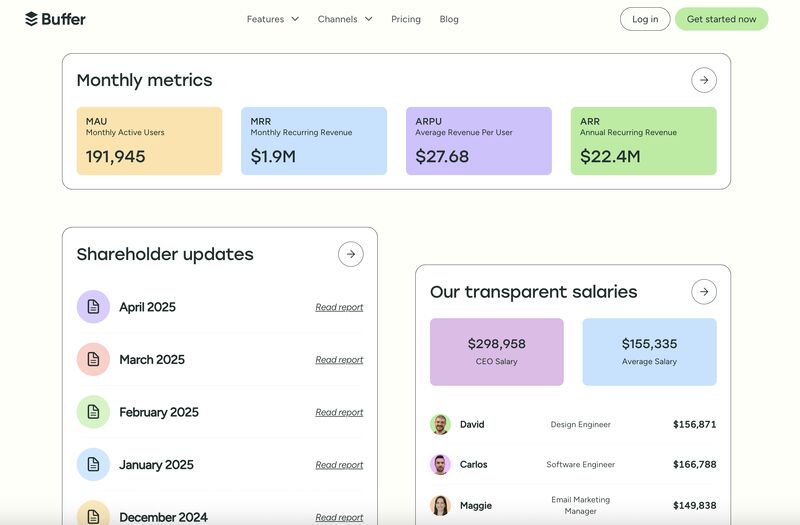
They share everything publicly. Not just revenue, but churn, employee salaries, team time off, team locations, and even their product roadmap.
It does not come without risks. By sharing everything they invite scrutiny at every level: a churn rate above 6%, a response rate inside two hours of 63.73% which is below average, flat signups and traffic, and public salaries that could tempt competitors to tailor offers to their best people.
But it is honest. Instead of doing what nearly every company does, trying to appear to have more employees, more revenue and better fundamentals than they actually do, Buffer takes the good with the bad.
It pushes the internal team with radical accountability, and it shows the human side of the business, which matters for conversion. When they raise prices, a customer can see the roadmap and understand where the money goes.
Steal this
Run three CTAs in the hero, not one
June 2025
Anchor gives the hero three calls to action mapped to three levels of intent. Our data already says two beats one.
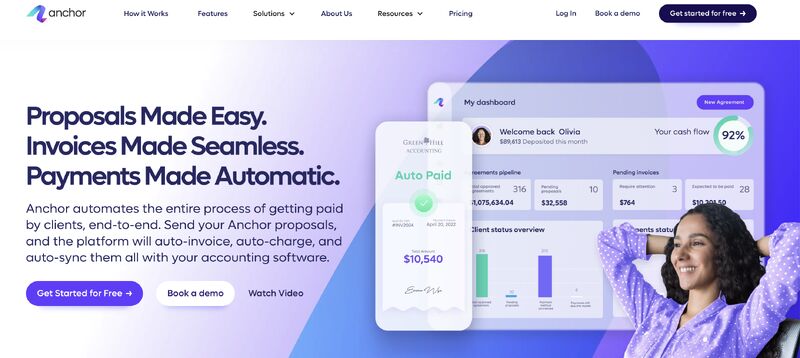
They have three CTAs in their hero. At first glance it feels like too much.
We analyzed the number of CTAs in the hero and found that 41 out of 68 tests showed two CTAs beating one. It was a clear winner.
The logic behind two winning is tied to visitors arriving at different stages. Retargeting ads bring people ready to trial or buy, while an organic post sends people with only a mild understanding of what you do.
So why limit it to two? If the CTAs are clear, non-competing, and map to different levels of intent, there is little harm in leveraging more.
Steal this
Break your own funding news before the press does
May 2025
Rippling self-published its $450m raise before any outlet could. The canonical URL, and every backlink that followed, sits on their domain.
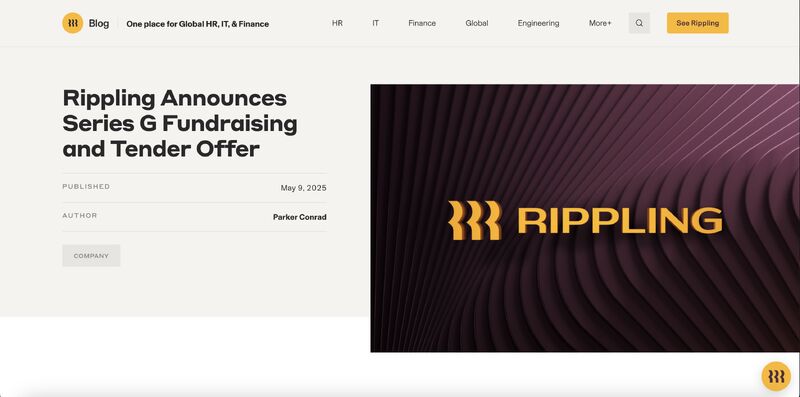
Before TechCrunch, Reuters or any major outlet could break the story, they self-published it on their blog. The full press release copy, CEO quotes and valuation details all live on their domain.
They own the canonical URL, so Google indexes Rippling’s page first. All the SEO value, keyword rankings and backlinks accrue to their domain.
The social buzz hits their site rather than someone else’s. Within hours the major outlets published the story and quoted the Rippling blog verbatim, linking back to the original.
They repeat it for new features, funding rounds, acquisitions and partnerships, and each one amplifies domain authority. Search funding news for brands that did not do this and you find their own post buried below a sea of outlets that moved first.
Steal this
Give away 50 free tools and let them carry the traffic
June 2025
Half of Ahrefs’ site traffic comes from ungated free tools. Four of them account for over 20% on their own.
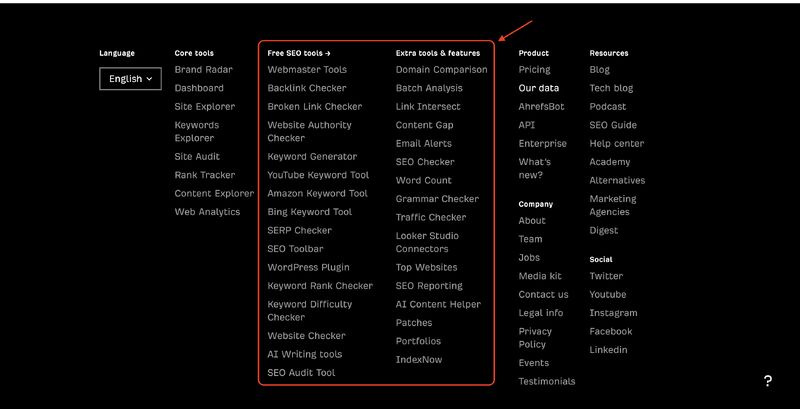
They generate 50% of their site traffic from ungated free tools, and they have more than 50 of them.
They use their own platform to uncover high-volume search opportunities, then define a specific narrow problem to solve. Each tool doubles as a lightweight product-validation mechanism.
Following the Pareto principle, most of the traffic comes from a handful. Traffic Checker, Backlink Checker, DR Checker and Keyword Generator account for over 20% between them.
The build philosophy is first do it, then do it right, then do it better. Ship fast even if the first version is imperfect, iterate on what resonates, and use AI tooling to make shipping cheap.
Steal this
Show how many reps are online before the chat even opens
August 2026
Stripe lists a live count of available sales reps and a green status dot on its chat widget. The team reported a meaningful lift in engagement from the change.
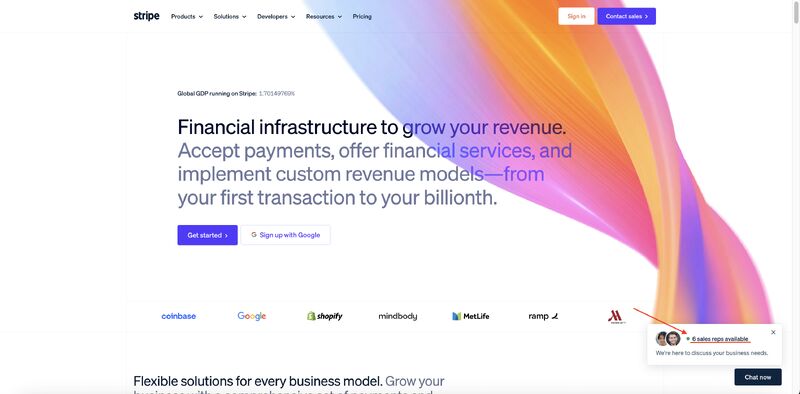
Instead of a generic "chat with us" prompt, the widget names how many reps are online right now and shows a green availability indicator.
Two things get signaled at once: a real person is on the other end, and the wait will be short because reps are already available.
It is a small trust and speed cue layered onto an otherwise ordinary chat widget, and Casey Hill reported Stripe saw a substantial lift in engagement after adding it.
The preference is not universal though. Docket ran a similar test between a human chat path and their AI agent, Aura, and more visitors chose the agent, in part because it felt faster and less like a sales pitch.
Steal this
Make “SaaS contracts killed” the headline of your social proof
September 2026
Lovable is leaning into the idea that vibe coding tools can replace conventional SaaS subscriptions, with a testimonial claiming “$1M+ SaaS contracts on track to be retired.”
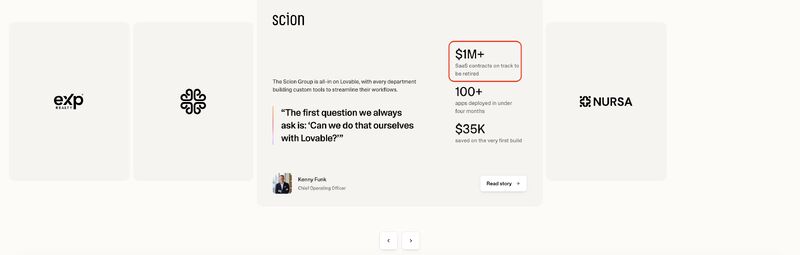
Lovable is using “SaaS contracts killed” in their social proof, leaning into the idea that vibe coding tools can replace conventional SaaS subscriptions. One of their testimonials claims, “$1M+ SaaS contracts on track to be retired.”
Whether from Lovable or Claude Code, every vendor in the SaaS industry feels this pressure from a new way of operating.
The question has always been: when are vibe coding tools genuinely production-ready enough to not just prototype but replace functional tooling used by an entire team?
Lovable says the time is now.
Steal this
How to get agents to pick your tool
September 2026
Clay ships its MCP and API tooling with agent-specific instructions on what each capability does and when to call it. Casey Hill went looking for why coding agents keep defaulting to the same handful of vendors, Clay among them, and traced it back to how legible the tool surface is.
Clay packages its MCP tools with instructions written for an agent to read: what each capability does, when to reach for it, and how to chain several calls into one outcome, on top of an interface broad enough to run an entire GTM workflow, search, enrichment, and custom steps, without the agent needing a second vendor.
What makes an agent stubbornly choose one SaaS vendor over another?
Recently, there was a clip from Jason M. Lemkin where he talks about how his agents consistently chose Clay for their GTM objectives (insisting on them 6 different times).
It took me down a rabbit hole of research, interviews and testing (shoutout to my friends at Linear, Glean, Clay and Stripe for insights).
What about the MCPs, APIs or CLIs of certain SaaS makes them get preferentially selected by agents?
There are a lot of potential factors, but here are some best practices I am learning…
Steal this
Add “Sign up with Google” as a second hero CTA
October 2026
More than 50 major SaaS companies, from Stripe to Zapier, have added “Sign up with Google” as a secondary homepage hero CTA. We ran it through the DoWhatWorks agent to see what the testing says.
A second call to action in the homepage hero, “Sign up with Google”, sitting beside the primary signup button.
Testing strongly supports two CTAs over one in the hero. The idea is simply that you want to engage prospects with multiple levels of intent. Barring a startup-stage brand that strictly drives traffic from a single source, and so has uniform intent, you want to go with two.
Sign up with Google is a low-friction path, and testing consistently supports low-friction intake paths. It is why embedded email capture CTAs work well and why progressive profiling forms perform well. The data on A/B testing Google sign-ups specifically is sparse, but it looks like a decent bet.
There is a catch in an agentic world. Sign up with Google is a solid shortcut for humans but potentially an obstacle for agents, because these flows are built around human interaction and authentication.
Steal this